Configure Fiddler Classic to Decrypt HTTPS Traffic
Update: If you're looking for cross-platform HTTPS capturing and decrypting tool, check out the new Fiddler Everywhere! Check this blog post to learn more about it or directly see how easy is to capture and inspect HTTPS traffic with Fiddler Everywhere.
By default, Fiddler Classic does not capture and decrypt secure HTTPS traffic. To capture data sent through HTTPS, enable HTTPS traffic decryption.
Enable HTTPS traffic decryption
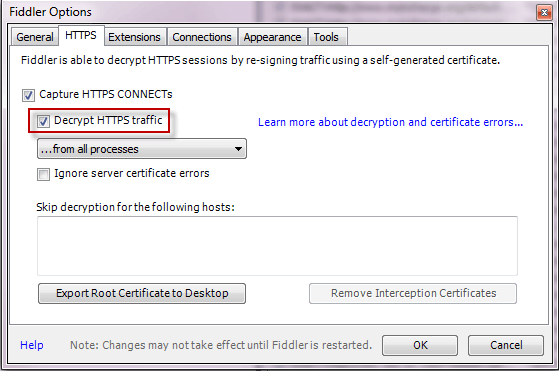
Click Tools > Options > HTTPS.
-
Click the Decrypt HTTPS Traffic box.
Skip traffic decryption for a specific host
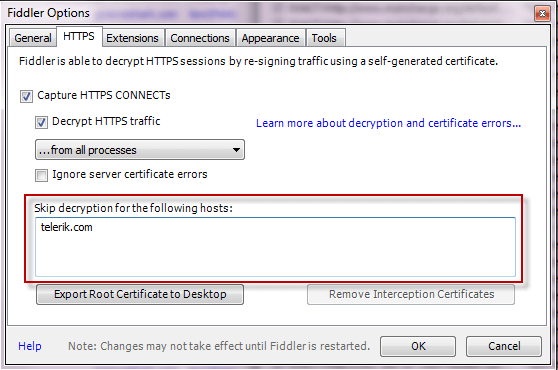
Click Tools > Options > HTTPS.
-
Type the hostname in the Skip Decryption.
Skip traffic decryption for an application
To skip traffic decryption for a specific application or to decrypt HTTPS traffic only from a single host, you must modify the OnBeforeRequest function in the FiddlerScript.
Add a rule like this inside the OnBeforeRequest function:
    if (oSession.HTTPMethodIs("CONNECT") && oSession["X-PROCESSINFO"] && oSession["X-PROCESSINFO"].StartsWith("outlook"))
    {
        oSession["x-no-decrypt"] = "boring process";
    }
Decrypt traffic from one hostname only
Add a rule like this inside the OnBeforeRequest function:
    if (oSession.HTTPMethodIs("CONNECT") &&
        !oSession.HostnameIs("SiteICareAbout.com"))
    {
        oSession["x-no-decrypt"] = "do not care.";
    }